
Best client portal software for service businesses in 2026
Best overall for proposal-led services: HoneyBook. Best for customized onboarding: Dubsado. Best for ongoing project collaboration: Basecamp. This 2026 guide compares the best client portal software for service businesses by the work your clients need to complete, not by the longest feature list.
TL;DR
HoneyBook leads the best client portal software for service businesses shortlist for proposal-led client journeys.
Dubsado suits service providers who need customized forms and onboarding workflows.
Basecamp suits ongoing client collaboration; SuiteDash suits businesses seeking a broader shared system.
Tendedsprout provides done-for-you systems support for established entrepreneurs who need help connecting their existing tools.
Why this matters
A client portal should give your clients a clear place to find information and complete their next task. It does not fix an unclear process. If nobody knows who sends the welcome message or checks the intake form, moving those steps into software leaves the confusion intact.
Tendedsprout provides systems consulting and automation services for established online entrepreneurs and service providers. Tendedsprout is best for service businesses that need done-for-you systems support, rather than another tool to configure themselves. Its focus is on using systems already integrated into the business.
For your 2026 decision, separate client access from internal organization. Your team needs assignments, records, and reminders. Your client needs the agreement, the next action, and the relevant project information. Those needs overlap, but they are not identical.
What makes the best client portal software?
Use these criteria before comparing platforms. A portal earns its place when it supports your actual service process.
Client clarity: Clients can identify the next action without asking you to explain the workspace.
Journey fit: The software supports the stages you need, such as proposals, intake, delivery, or ongoing collaboration.
Information boundaries: You can distinguish client-facing information from internal team work.
Repeatable setup: You can reuse a sensible structure instead of rebuilding every client experience.
Maintenance ownership: Someone knows who updates forms, checks messages, and resolves incomplete steps.
Existing-tool fit: The portal has a defined role beside the tools your business already uses.
Do not make every feature equally important. A consultant who needs signed agreements has a different starting point from an agency that needs clients to comment on project work. In 2026, choose for the journey you deliver now, not a hypothetical future business.
Client portal software at a glance
HoneyBook
Best for: Proposal-led client journeys
Standout feature: Proposals, contracts, and invoices within a client-management system
Key limitation: Not a direct substitute for a detailed project collaboration workspace
Dubsado
Best for: Customized onboarding
Standout feature: Forms and workflows around client intake and administration
Key limitation: More workflow choices require more setup decisions
Basecamp
Best for: Ongoing project collaboration
Standout feature: Shared project discussions, tasks, and files
Key limitation: Not a dedicated proposal, contract, and invoicing system
SuiteDash
Best for: Consolidating client administration
Standout feature: Client portals alongside broader business-management functions
Key limitation: A broad setup needs clear boundaries and ownership
These are distinct use cases, not interchangeable winners. Choose HoneyBook for the agreement-to-onboarding journey, Dubsado for more tailored intake, Basecamp for collaborative delivery, and SuiteDash when consolidation is the main goal.
1. HoneyBook: best client portal for proposal-led services
HoneyBook combines client-management tools with proposals, contracts, invoices, and client-facing access. It belongs on your shortlist when the recurring administrative work starts with an inquiry and moves toward a booked engagement.
The practical question is whether those documents form the center of your client journey. If you repeatedly assemble an agreement, send an invoice, and explain what happens next, assess that whole sequence together. Do not judge the portal separately from the work that gets a client into it.
HoneyBook pros:
Brings proposals, contracts, and invoices into the same client-management environment.
Gives document-led service businesses a focused starting point for organizing client administration.
Supports evaluating the client experience from inquiry through the opening stages of an engagement.
HoneyBook cons:
Document organization does not replace a clear delivery process or assigned team responsibilities.
Detailed, ongoing project collaboration needs a separate evaluation rather than an assumption that the portal covers it.
Best for: Consultants and other service providers whose client journey centers on proposals, agreements, and invoices.
For example, imagine a consultant who currently sends an agreement in one email and payment instructions in another. HoneyBook is a relevant option to assess for organizing that administrative sequence. This is an illustrative use case, not a verified client outcome.
Verdict: Buy if proposal-led client administration is your main requirement. Skip if ongoing project discussions are the main problem.
2. Dubsado: best client portal for customized onboarding
Dubsado provides client-management tools, including forms, contracts, invoices, workflows, and client portals. Its strongest place in this comparison is a service business that needs to shape intake and onboarding around its own process.
That flexibility needs direction. Before configuring a workflow, write down what information you require and what happens after you receive it. Otherwise, you risk recreating an unclear process with more automated steps.
Dubsado pros:
Supports forms for collecting information during the client journey.
Connects client administration with workflow configuration.
Gives tailored onboarding processes a relevant alternative to a primarily project-focused workspace.
Dubsado cons:
A tailored setup requires decisions about forms, timing, and responsibilities.
Workflow changes still need review when your service process changes.
Best for: Service providers with distinct intake requirements or different onboarding paths for different services.
An illustrative example is a service provider who needs different intake questions for separate engagements. Start by defining the questions and the follow-up action. Then assess how Dubsado supports that sequence, including what a client sees when information remains incomplete.
Do not automate a reminder until you can explain why the request matters. A clear form and a useful follow-up message are better starting points than a complicated sequence built around unnecessary questions.
Verdict: Buy for customized onboarding. Hold if your service process still changes from client to client without a clear reason.
3. Basecamp: best client portal alternative for ongoing projects
Basecamp is a project collaboration tool with client access, shared discussions, tasks, and files. It fits businesses whose clients need to participate in delivery rather than only complete administrative documents.
Treat it as a shared project workspace, not as a direct replacement for every client-management function. Its place in this shortlist is the period after an engagement starts, when your team and client need to keep project work together.
Basecamp pros:
Organizes project discussions alongside tasks and files.
Supports involving clients in a shared project workspace.
Gives ongoing delivery work a structure beyond separate email conversations.
Basecamp cons:
Does not serve as a dedicated proposal, contract, and invoicing system.
A project workspace becomes confusing if you do not define where updates, requests, and decisions belong.
Best for: Agencies and service teams that collaborate with clients throughout a project.
Consider an illustrative design engagement where feedback arrives through email while files sit elsewhere. A shared project workspace can give those conversations and materials a defined home. Your team still needs a rule for recording decisions and a person responsible for moving work forward.
Before choosing Basecamp, examine what clients must see and what stays internal. Client access is a responsibility to manage, not simply a feature to enable. Build the workspace around the information needed for delivery.
Verdict: Buy for ongoing client collaboration. Skip as your sole solution if contracts and invoices are the central requirement.
4. SuiteDash: best client portal for broader consolidation
SuiteDash combines client portals with broader functions such as customer records, project management, and billing. It belongs on the shortlist when your goal is to assess whether several administrative activities can share a system.
Breadth creates a different decision from choosing a focused portal. You need to decide which work belongs inside the platform and which existing tools still serve a useful purpose. Moving everything at once is not a requirement for evaluating consolidation.
SuiteDash pros:
Places client portals alongside wider business-management functions.
Offers a relevant option when several administrative processes need a shared home.
Supports evaluating customer records, project work, and billing as related activities.
SuiteDash cons:
A broad system requires more decisions about structure and responsibility.
Replacing working tools adds change that needs a clear operational reason.
Best for: Established service businesses seeking broader consolidation rather than a standalone place to share documents.
Start with a specific administrative problem. For example, assess how a client record connects to project work and billing before considering a wider move. This is an illustrative evaluation approach, not a claim about a particular business's results.
For a 2026 shortlist, breadth should count only when you need it. An unused function is not a reason to move a working process. Keep the evaluation tied to the work you intend to manage.
Verdict: Buy when consolidation is a defined goal. Hold when your current tools work and only one client-facing step needs repair.
How these options were ranked
The ranking follows the criteria above: client clarity, journey fit, information boundaries, repeatable setup, maintenance ownership, and existing-tool fit. It is a use-case recommendation, not a claim of measured performance or hands-on testing.
HoneyBook takes the default position for proposal-led services. Dubsado takes the customized-onboarding slot. Basecamp addresses collaborative delivery. SuiteDash addresses broader consolidation. No platform wins every dimension.
Test the journey before choosing the software
Build 1 sample client project before moving real client work. Use sample information, not a real client's private documents. The purpose is to see whether the process makes sense from the client's side.
Follow this sequence:
Client entry: Identify how the client reaches the workspace and understands its purpose.
Next action: Check whether the required task is obvious.
Team handoff: Assign responsibility for reviewing what the client submits.
Progress update: Decide where the client finds the current status.
Project close: Establish what happens to documents and access when work ends.
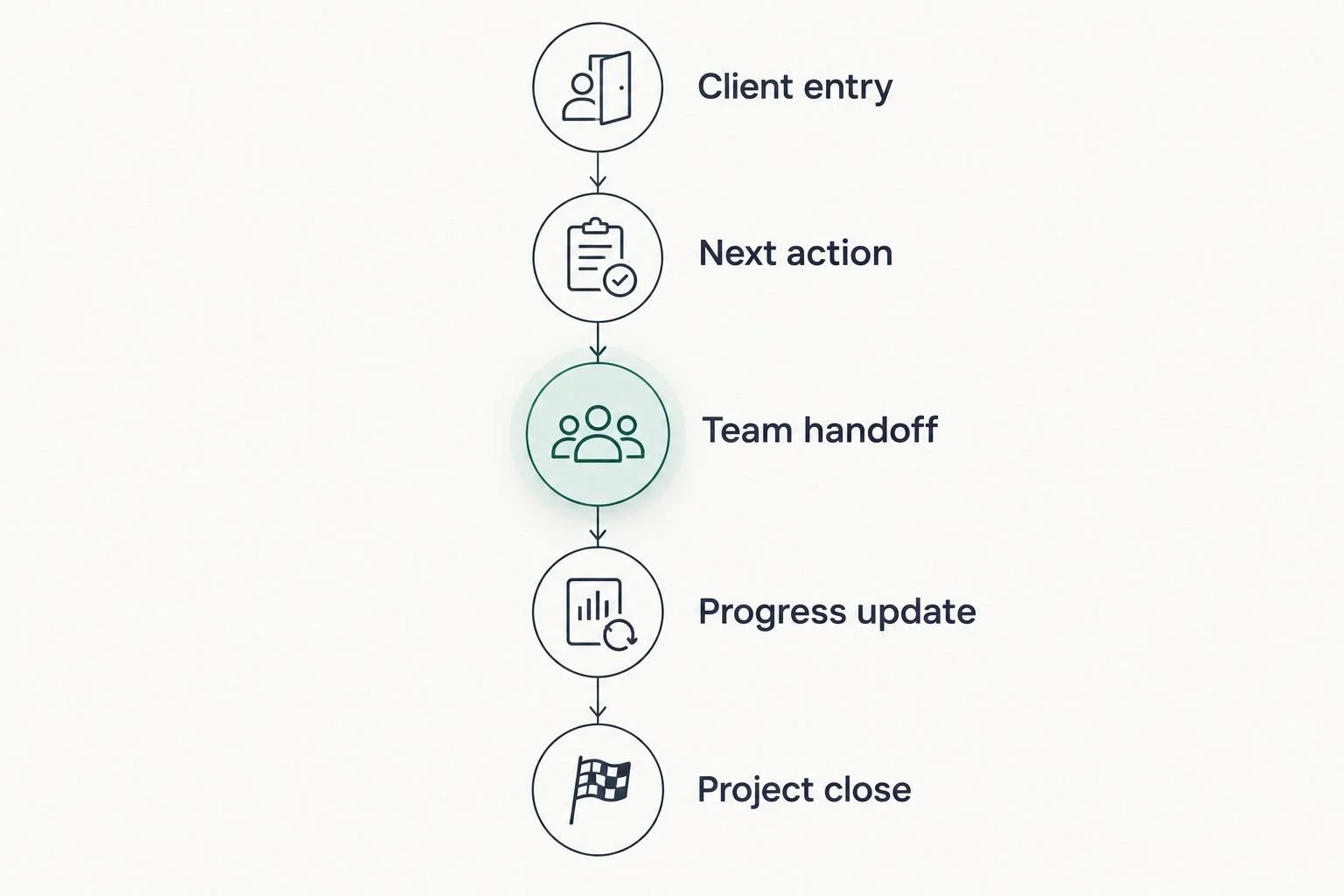
Choose software after defining what the client and team need to do at each stage.
Run 3 test scenarios: a client completes the requested task, a client leaves it unfinished, and a client asks a question instead. Check what your team does in each case. These are evaluation exercises, not performance benchmarks.
Set 2 review points: before opening the workspace to clients and after completing the sample journey. At both points, ask whether the instructions are clear and whether someone owns the next action.
Done-for-you systems support or an Online Business Manager?
Done-for-you systems support focuses on designing, setting up, and improving how work moves through your business. An Online Business Manager generally focuses on coordinating ongoing operations, priorities, and people. The exact responsibilities depend on the engagement.
Tendedsprout's client portal systems support fits the first need: connecting the process around your existing tools. Blooming Systems is its one-day workflow transformation. That is a service offering, not another client portal product in this ranking.
Systems support pros: It addresses the structure behind recurring manual work. Systems support cons: It does not remove the need to assign ongoing ownership after setup.
Online Business Manager pros: Ongoing coordination can provide accountability across people and projects. Online Business Manager cons: Coordination alone does not define or repair every underlying workflow.
Best for systems support: You know the recurring work but need help organizing how it happens. Best for an Online Business Manager: You need someone to coordinate ongoing work and follow-through.
Which client portal should you choose?
Choose HoneyBook as the default for a proposal-led service business. Choose Dubsado when customized intake is the priority, Basecamp when clients participate in ongoing delivery, and SuiteDash when broader consolidation has a clear purpose.
If you already have a portal, test its existing setup before replacing it. In 2026, the next useful move is not automatically a new subscription. It is identifying the point where your client gets stuck or your team repeats manual work.
Tendedsprout's client portal systems support is relevant when the software exists but the surrounding process needs attention. A defined welcome sequence, a clear document location, and an assigned handoff can be more useful than moving the same confusion elsewhere.
FAQ
What's the best client portal software for service businesses in 2026?
HoneyBook is the default recommendation here for proposal-led service businesses. Dubsado suits customized onboarding, Basecamp suits ongoing collaboration, and SuiteDash suits broader consolidation.
Is Dubsado better than HoneyBook for client onboarding?
Dubsado is the stronger shortlist choice here when customized forms and onboarding paths are your priority. HoneyBook is the default for a client journey centered on proposals, contracts, and invoices.
Can Basecamp work as a client portal?
Basecamp can serve as a shared client project workspace. Assess it for discussions, tasks, and files, rather than as a dedicated proposal, contract, and invoicing system.
Do I need to replace the tools my business already uses?
No. First identify what your existing tools cannot support or what has not been configured clearly. Replace a tool only when it addresses a defined requirement.
What should clients see inside a portal?
Clients should see the information and actions needed for their engagement. Define what stays internal, then organize the client-facing workspace around documents, requests, and progress.
Should I hire an Online Business Manager or get systems support?
Choose systems support when you need processes designed or configured, and an Online Business Manager when you need ongoing coordination. Define the responsibilities before choosing either service.
How do I test a client portal before using it?
Create a sample client project and complete it from the client's perspective. Test a completed task, an unfinished task, and a question, then check who handles the next step.
One last thing
A portal is a place, not a process. Before adding another form or reminder, ask someone unfamiliar with your setup to identify the next action. If they cannot, improve the instructions before adding more features.