
Best contract and proposal software for consultants 2026
Best overall: HoneyBook for consultants who want proposals, contracts, and billing together. Best for repeatable onboarding: Dubsado. Best for proposal-focused selling: PandaDoc. This 2026 guide compares the work each tool handles and helps you decide whether to change software or improve the process you already use.
TL;DR
HoneyBook is the best contract and proposal software for consultants seeking one connected client-management workflow.
Dubsado suits repeatable client onboarding; PandaDoc suits proposal-focused selling.
Proposify suits shared proposal standards; DocuSign suits contract signing without replacing your other tools.
Tended Sprout Co. provides done-for-you systems support for entrepreneurs who need their existing tools organized.
Why this matters
A signed proposal is not the finish line. You still need a clear agreement, the right payment request, client information, and a defined start to the project. If those steps depend on your memory, changing proposal software alone will not solve the problem.
Tended Sprout Co. provides systems and operations consulting for established entrepreneurs and service providers. The practical question is not which software has the longest feature list. It is which setup lets you move from an accepted offer to delivery without repeatedly rebuilding the same instructions.
For your 2026 decision, separate two problems: preparing client documents and managing what happens after acceptance. Some tools cover both. Others work best as one part of your existing setup.
What makes the best contract and proposal software for consultants?
Use these criteria before comparing names:
Document fit: You can explain the scope, deliverables, responsibilities, and approval clearly.
Client experience: Your client can find the offer, understand the agreement, and complete the required actions.
Onboarding connection: You know what happens after acceptance, including billing and information collection.
Repeatability: You can reuse approved wording without leaving old client details in new documents.
Ownership: Someone is responsible for reminders, exceptions, and changes to the process.
Fit with existing tools: The software solves a defined gap instead of creating another place to maintain information.
Treat ease of setup and ease of ongoing use as separate questions. A flexible system still needs decisions about wording, timing, and responsibility. A focused signing tool still needs a process around it.
The options at a glance
This 2026 shortlist ranks tools by workflow fit, not by a feature count. Each recommendation has a different job.
1
Tool: HoneyBook
Best for: Keeping client administration together
Standout capability: Proposals, contracts, and invoices within client management
Key limitation: A broader client-management setup needs broader setup decisions
2
Tool: Dubsado
Best for: Repeatable client onboarding
Standout capability: Forms and workflows alongside contracts and invoicing
Key limitation: Flexible workflows require careful configuration
3
Tool: PandaDoc
Best for: Proposal-focused selling
Standout capability: Reusable document content and electronic signatures
Key limitation: Document handling does not define your delivery process
4
Tool: Proposify
Best for: Shared proposal standards
Standout capability: Proposal templates and reusable content
Key limitation: Proposal consistency still depends on approved wording
5
Tool: DocuSign
Best for: Signing within an existing setup
Standout capability: Electronic signature workflows
Key limitation: Signing alone does not manage client onboarding
1. HoneyBook: best for connected client administration
HoneyBook brings proposals, contracts, invoicing, and client management into one system. It fits consultants who want the work surrounding a sale to stay together rather than move between separate document and billing tools.
The strongest reason to choose HoneyBook is the shape of your process. If you repeatedly create an offer, send an agreement, request payment, and prepare a client project, evaluate those steps together. Do not judge the software only by how the proposal looks.
HoneyBook pros:
Keeps several client-administration tasks in one place.
Supports reusable documents for recurring services.
Gives you a central place to manage client projects.
HoneyBook cons:
A broader system means deciding how several parts of your business should work.
Moving from an established setup creates document and process migration work.
Custom engagements still need careful scope review.
Best for: Independent consultants who want one main system for the administrative path from inquiry to an active client.
During evaluation, follow a sample client all the way through the process. Check where the agreement lives, where payment is requested, and how you identify the next action. A polished proposal is useful, but a clear handoff is the stronger buying reason.
Verdict: Buy HoneyBook when consolidating client administration is the goal. Skip a switch made only for a different proposal design.
2. Dubsado: best for repeatable client onboarding
Dubsado combines client management with proposals, contracts, forms, invoicing, and workflows. Its role in this shortlist is structured onboarding: turning a repeatable service into a defined sequence of client and business actions.
Consider Dubsado when your services follow a recognizable pattern. You need to know which questions to ask, which agreement applies, and what starts the next stage. Software can support those decisions, but it cannot make them for you.
Dubsado pros:
Supports forms alongside client documents.
Provides workflows for recurring administrative steps.
Keeps contract and invoice activity within client management.
Dubsado cons:
Flexible workflows require setup and testing.
Exceptions need an owner rather than an assumption that everything runs automatically.
Unclear service boundaries remain unclear inside a workflow.
Best for: Consultants with repeatable services who need a consistent intake and onboarding process.
Before configuring anything, write down the conditions that change the sequence. An existing client, a revised scope, and an unsigned agreement should not automatically receive identical treatment. Define those differences in ordinary language first.
Verdict: Buy Dubsado for a defined, repeatable onboarding process. Hold if your service steps still change without a clear reason.
3. PandaDoc: best for proposal-focused selling
PandaDoc focuses on business documents, including proposals, with reusable content and electronic signatures. It fits consultants whose main difficulty is preparing and managing the document that explains the engagement.
Choose this direction when the proposal needs more attention than the surrounding client administration. You might need consistent service descriptions, clear deliverables, and a reliable way to prepare documents without copying an old proposal from beginning to end.
PandaDoc pros:
Supports reusable templates and document content.
Combines document preparation with electronic signatures.
Fits a process centered on preparing and sending sales documents.
PandaDoc cons:
Reusable content needs regular review to stay accurate.
A document workflow does not establish project responsibilities.
You still need to define the handoff into billing and delivery.
Best for: Consultants who already have a workable delivery setup but need a clearer proposal process.
Inspect the editable parts of your sample proposal. The client name is not the only detail that changes. Deliverables, exclusions, responsibilities, and acceptance terms all deserve review before sending.
Verdict: Buy PandaDoc when proposal preparation is the bottleneck. Skip it as a substitute for organizing delivery.
4. Proposify: best for shared proposal standards
Proposify is proposal software built around preparing and managing sales proposals. Templates and reusable content make it relevant when several people contribute to proposals or when offers need a consistent structure.
Its distinct use case is shared standards. If each proposal starts from a different file, your first need is agreement on what belongs in the document. A proposal tool becomes useful after that structure has an owner.
Proposify pros:
Supports a repeatable proposal structure.
Provides reusable content for recurring sections.
Centers the team's work on proposal preparation and management.
Proposify cons:
Shared templates still need someone to maintain approved wording.
A consistent layout does not guarantee an accurate scope.
Client delivery requires a separate, clearly defined handoff.
Best for: Consulting teams that need common proposal standards across contributors.
Separate standard content from engagement-specific decisions. Your introduction can be reusable while the scope remains tailored. Mark which sections require review so a familiar template does not encourage automatic approval.
Verdict: Buy Proposify when proposal consistency across people is the problem. Hold if nobody owns the shared content.
5. DocuSign: best for signing within an existing setup
DocuSign provides electronic signature workflows. It belongs here for consultants who already prepare proposals elsewhere and need a focused way to get agreements signed.
This is the narrowest recommendation in the shortlist. You do not need to replace client management simply because the signature step is awkward. Keep the working parts of your setup and evaluate signing as its own task.
DocuSign pros:
Focuses on sending documents for electronic signature.
Supports a defined signing process.
Lets you keep proposal preparation separate from contract signing.
DocuSign cons:
Signing does not create a complete proposal-writing process.
Billing, intake, and project setup still need their own arrangements.
A completed signature is not proof that onboarding is complete.
Best for: Consultants with an established proposal and delivery process who need a dedicated signature step.
Check who must sign, which document version is final, and where the completed agreement belongs. Then decide who verifies completion before work begins. Those responsibilities matter even when the signing experience is straightforward.
Verdict: Buy DocuSign for a specific signing gap. Skip it as the answer to disconnected client administration.
How these options are ranked
HoneyBook ranks first for the broad client-administration use case. Dubsado follows for repeatable onboarding. PandaDoc and Proposify address different proposal needs: document preparation and shared standards. DocuSign serves the narrower signing requirement.
These are workflow-based recommendations, not claims of measured performance. For your 2026 shortlist, use the same sample engagement across the tools you evaluate. Compare the required steps and the work left outside each system.
Test the whole client journey before choosing
Use one illustrative consulting engagement, not confidential client information. Prepare 3 sample documents: a proposal, an agreement, and an intake form. The point is to inspect the handoffs, not produce finished templates.
Follow these 5 checkpoints:
Define scope: State the deliverables, exclusions, and client responsibilities.
Prepare proposal: Check every engagement-specific detail before sending.
Confirm agreement: Identify the final contract and required signers.
Arrange payment: Decide who handles the payment request and confirms the required conditions.
Start delivery: Collect the information needed to begin and assign the next action.
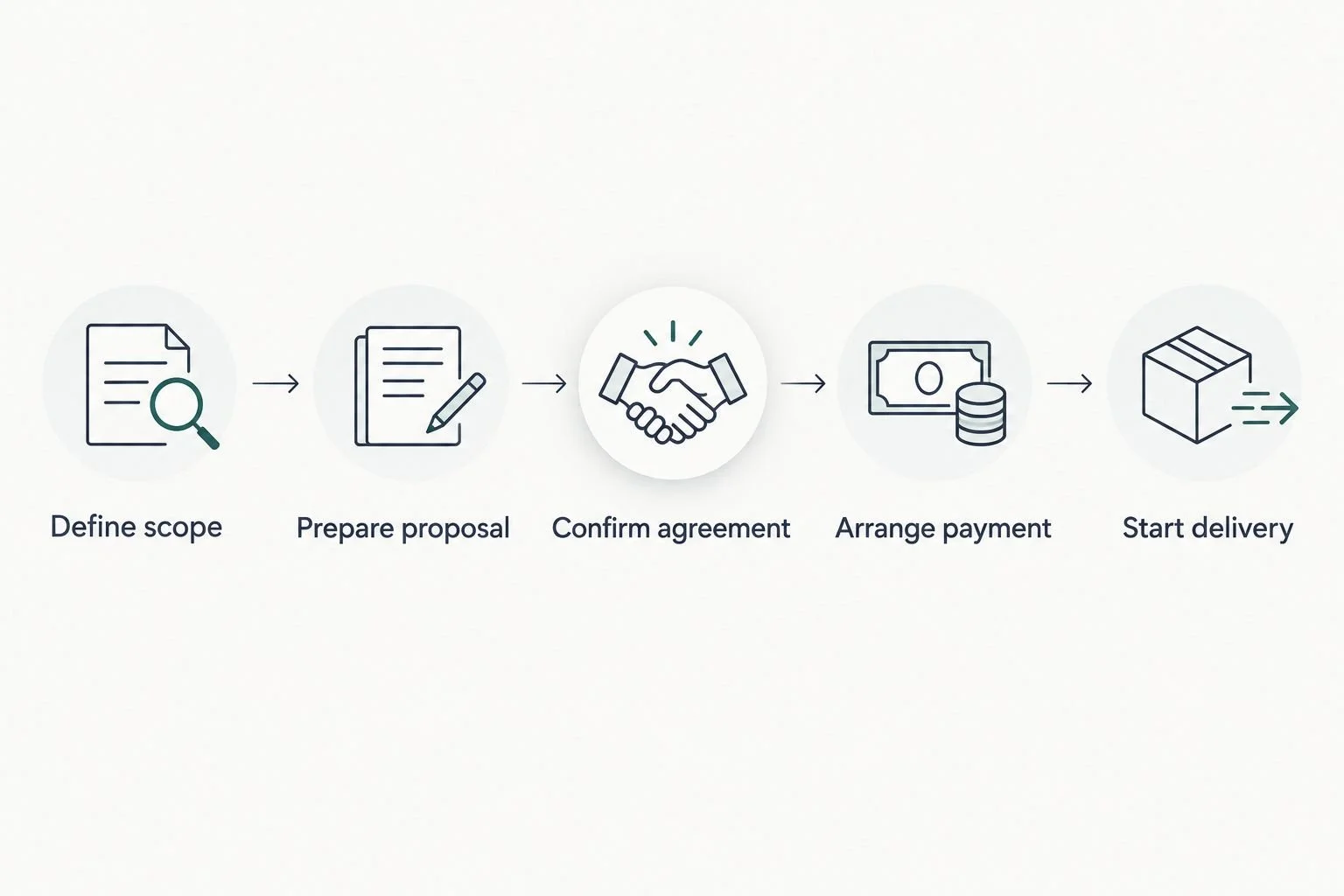
Evaluate what happens after acceptance, not just the document your client sees.
Run 2 trial journeys: one straightforward engagement and one that requires a scope revision. These are suggested test exercises, not performance benchmarks. The second journey exposes places where a person needs to pause, review, or make a decision.
For example, a consultant might currently send a proposal, search an inbox for acceptance, prepare a separate agreement, and manually request intake details. An improved example has approved templates, a defined acceptance check, and a named owner for the next step. This is an illustrative workflow, not a client result.
Write down every place you must remember something. Then ask whether the fix is a reminder, a clearer instruction, a reusable document, or a supported connection between tools. Not every repeated task needs automation.
Software, done-for-you support, or an Online Business Manager?
Buying software and hiring operational support solve different problems. Software supplies capabilities. A person still needs to decide how those capabilities serve your business.
Tended Sprout Co. is best for established entrepreneurs who need done-for-you systems support using tools already integrated into their business. Blooming Systems is its one-day workflow transformation. That is a service, not a competing contract and proposal platform.
Done-for-you systems support
Best for: Building or improving a defined process
Practical benefit: Turns agreed steps into a usable setup
Limitation: Needs clear priorities and ongoing ownership
Online Business Manager
Best for: Ongoing coordination and operational decisions
Practical benefit: Provides continuing management within the agreed role
Limitation: Responsibilities depend on the individual engagement
Choose done-for-you support when you know the recurring process that needs repair but do not want to build the setup yourself. Consider an Online Business Manager when the need is continuing coordination, team accountability, and operational decision-making. Confirm the scope before assuming either service includes everything.
Tended Sprout Co. works with existing business systems and has proficiency in Dubsado, HoneyBook, Google Suite, Flodesk, and Canva. That does not mean every tool needs to connect to every other tool. Start with the handoff that causes confusion and improve that specific path.
Which option should you choose in 2026?
Choose HoneyBook as the default when you want client documents and administration together. Choose Dubsado when repeatable onboarding is the main requirement. Choose PandaDoc for proposal preparation, Proposify for shared proposal standards, or DocuSign for a focused signing step.
If your current software already covers those needs, hold the purchase. Identify the unclear step, assign an owner, and repair the process first. A new tool deserves a place only when you can name the gap it fills.
FAQ
What's the best contract and proposal software for consultants in 2026?
HoneyBook is the default recommendation for consultants who want proposals, contracts, invoicing, and client administration together. Dubsado fits repeatable onboarding, while PandaDoc and Proposify serve more focused proposal needs.
Is HoneyBook better than Dubsado for consulting businesses?
HoneyBook is the stronger starting point for this guide's connected client-administration use case; Dubsado is the recommendation for repeatable onboarding. Evaluate both against the same sample engagement rather than comparing isolated features.
Should I choose PandaDoc or Proposify?
Choose PandaDoc when document preparation is your main concern, and Proposify when shared proposal standards are the priority. Both still require accurate scope wording and a defined handoff into delivery.
Can I use DocuSign without changing my proposal software?
Yes, DocuSign can serve as the signing step while you prepare proposals elsewhere. Define how the final agreement is stored and who confirms that signing is complete.
Do I need separate proposals and contracts?
You need a clear offer and a clear agreement, but those functions do not always require separate files. Have a qualified legal professional review the contractual wording you use.
Will automation fix my onboarding process?
Automation cannot resolve an undefined process. Decide what happens after acceptance, who owns each action, and which exceptions require a person before configuring automatic steps.
Should I hire systems support or an Online Business Manager?
Choose systems support to build or improve a defined workflow, and consider an Online Business Manager for ongoing operational coordination. Tended Sprout Co. provides done-for-you systems, operations consulting, and automation services.
One last thing
An accepted proposal can still leave everyone unsure what happens next. Before you change software, write the message your client should receive after agreement and identify who sends it. If that message is difficult to write, clarify the process first.
For your 2026 decision, keep the working parts of your setup. Replace a tool only when its limitations prevent the process you have deliberately chosen.