
Best knowledge base software for growing teams: Notion 2026
Best overall for an internal knowledge base: Notion. Best for teams already using Google Suite: Google Docs. Best for detailed project documentation: Confluence. This 2026 guide compares five options by the work you need them to support, including customer-facing help content.
TL;DR
Notion is the best knowledge base software for growing teams that need flexible internal documentation.
Google Docs fits teams that want to organize existing instructions without adding another workspace.
Confluence suits detailed project documentation; Help Scout suits customer support articles.
Document360 suits a dedicated knowledge base. Choose the audience before choosing the software.
Tendedsprout provides done-for-you systems support, not knowledge base software.
Why this matters
A growing team needs answers that do not depend on the founder being available. When instructions sit across messages, documents, and someone's memory, adding another tool does not solve the underlying problem. You need a clear home for the current answer.
Tendedsprout provides systems and operations consulting and automation services for established online entrepreneurs and service providers. That distinction matters here: software holds your knowledge, while systems support helps you decide how that knowledge fits into daily work.
Keep your existing tools when they can support a clear, maintainable process. Switch when you can name the job your current setup cannot handle.
What makes the best knowledge base software for growing teams?
Use these criteria before comparing features. A useful knowledge base makes the right answer easier to find and easier to maintain.
Audience fit: Decide whether employees, contractors, customers, or several audiences need access. Internal instructions and public help articles serve different purposes.
Findability: Look for clear navigation, useful search, and a structure that matches the questions people ask.
Editing effort: The people responsible for a process need a practical way to update its instructions.
Access control: Keep internal decisions and client information separate from content intended for wider use.
Workflow fit: Choose a home that connects naturally with where your team already works.
Ownership: Assign responsibility for keeping each important guide current. Software does not make outdated instructions accurate.
For your 2026 shortlist, write the audience and main use case beside every candidate. Remove options that solve a different problem, even if their feature lists look impressive.
Knowledge base software at a glance
The order below follows the recommendations in this guide. It is a decision tree, not a claim that every team needs the first option.
Notion
Best for: Flexible internal knowledge
Standout capability: Pages and databases in one workspace
Key limitation: Flexible structure needs clear rules
Google Docs
Best for: Organizing existing instructions
Standout capability: Shared document editing within Google Drive
Key limitation: Separate documents need an intentional index
Confluence
Best for: Detailed project documentation
Standout capability: Spaces and linked documentation pages
Key limitation: Structure needs attention as content grows
Help Scout
Best for: Customer support articles
Standout capability: Docs alongside customer support tools
Key limitation: Customer help is a different job from internal operations
Document360
Best for: A dedicated knowledge base
Standout capability: Knowledge base publishing and organization
Key limitation: A separate publishing home adds maintenance work
1. Notion: best knowledge base software for flexible internal guides
Notion combines pages and databases in a shared workspace. You can use that flexibility to organize process instructions, team reference material, and links to working documents. It is a strong default when you want an internal knowledge base rather than a public support center.
Notion pros:
Pages support written instructions and supporting material together.
Databases give you another way to organize reference content.
Linked pages let you connect an overview with detailed procedures.
Notion cons:
An open-ended workspace needs naming and organization rules.
Building elaborate pages can distract from writing clear instructions.
An illustrative setup is a client-delivery home page with links to onboarding, project handoffs, and completion steps. Each guide answers a distinct question. You do not need a complicated dashboard to make that arrangement useful.
Before moving everything into Notion, try one recurring process. Ask a teammate to locate its instructions without a direct link. If the page is difficult to find, improve the structure before expanding it.
Best for: Teams building a flexible internal reference space with someone responsible for its organization.
Verdict: Buy into Notion when flexibility is useful and ownership is clear. Skip an elaborate rebuild when existing documents already do the job.
2. Google Docs: best for teams already working in Google Suite
Google Docs supports shared document creation and editing, with documents organized through Google Drive. It is not a dedicated knowledge base platform, but it can serve as a practical documentation home when your team already uses Google Suite.
The advantage is continuity. You can improve the instructions you already have instead of asking everyone to adopt another workspace.
Google Docs pros:
Shared editing supports collaborative instructions.
Comments help teammates discuss unclear steps.
Existing documents can remain in the team's familiar working environment.
Google Docs cons:
A collection of documents needs a clear starting page.
Similar filenames and duplicate copies make the current answer harder to identify.
Create an index that groups documents by the work people perform. Use descriptive titles such as Client Onboarding or Project Handoff. Avoid organizing everything around the names of the people who originally wrote it.
For a focused 2026 starting point, select 5 guides that answer recurring questions. This is a suggested rollout scope, not a platform limit. Give each guide an owner and link it from the same index.
Best for: Established service businesses that need better organization before they need another tool.
Verdict: Hold your Google Docs setup and improve its structure before replacing it.
3. Confluence: best for detailed project documentation
Confluence organizes documentation into spaces and pages. Its connection with Jira makes it relevant when project documentation and tracked work need to sit within the same broader tool environment.
Choose it for the way your team documents work, not simply because your business is growing. Detailed project records and a small collection of onboarding instructions have different needs.
Confluence pros:
Spaces provide a way to separate documentation areas.
Linked pages support layered instructions and reference material.
Its relationship with Jira suits teams already using that environment.
Confluence cons:
Deep page structures need upkeep to remain easy to browse.
A formal documentation workspace is unnecessary when a simple index meets your needs.
For an illustrative service-delivery setup, keep project decisions separate from reusable operating instructions. A decision about one client's project should not silently become the default procedure for every client.
Name the person responsible for each documentation area. Otherwise, the structure can remain tidy while the actual instructions become outdated.
Best for: Teams maintaining detailed project knowledge, particularly when Jira is already part of their work.
Verdict: Buy into Confluence for structured project documentation. Skip it when your main need is a straightforward document library.
4. Help Scout: best for customer support knowledge
Help Scout includes Docs for publishing customer help articles alongside its customer support tools. That makes it a relevant choice when the knowledge base exists to answer customer questions rather than teach employees how to run the business.
Separate those purposes before comparing products. An article explaining how a customer submits information is not the same as the internal procedure for reviewing it.
Help Scout pros:
Docs provides a home for customer-facing help articles.
Customer support and help content sit within the same product family.
Reusable articles can support consistent answers to recurring questions.
Help Scout cons:
Customer-facing content still needs editing and review.
A support-focused knowledge base does not replace internal operating instructions.
For an online educator, an illustrative help article might explain where learners find their course materials. The internal guide would explain who handles an access question and what information they need. Keep private account details out of the public article.
Best for: Businesses whose main knowledge base need is helping customers find answers.
Verdict: Buy into Help Scout when customer support is the central use case. Skip it as a substitute for an internal operations library.
5. Document360: best for a dedicated knowledge base
Document360 is a dedicated knowledge base platform for creating and organizing documentation. It belongs on your shortlist when publishing and maintaining a knowledge base is a distinct business need, rather than an extra function of your collaboration workspace.
The decision is about the publishing job. A dedicated platform makes sense when you need a deliberate documentation home and are prepared to maintain it.
Document360 pros:
Knowledge base publishing is its central purpose.
Article organization supports a structured documentation library.
A dedicated home separates reference content from everyday working files.
Document360 cons:
A separate platform creates another place your team must maintain.
Moving content does not resolve unclear instructions or missing ownership.
Before adding Document360 to your 2026 setup, list the requirements your current documentation home cannot meet. Then check the relevant capabilities and access settings directly with the vendor. A need for clearer writing alone does not justify a platform change.
Best for: Businesses that need a dedicated documentation publishing system.
Verdict: Buy into Document360 for a defined knowledge base publishing need. Wait if you are still deciding what the library should contain.
Make the knowledge base part of the workflow
Your knowledge base should explain what happens next, not just describe the business. Start with a recurring handoff where someone regularly needs clarification.
The following is an illustrative client-onboarding sequence, not a reported client result:
Request received: Identify where new client information arrives.
Details checked: State who checks whether the information is complete.
Work assigned: Explain who takes responsibility for the next task.
Guide linked: Place the relevant instructions beside that task.
Owner reviews: Assign responsibility for correcting the guide when the process changes.
Instead of searching old messages for instructions, a teammate reaches the guide from the work itself. That is the intended before-and-after change: fewer places to search, with a clear owner for the answer.
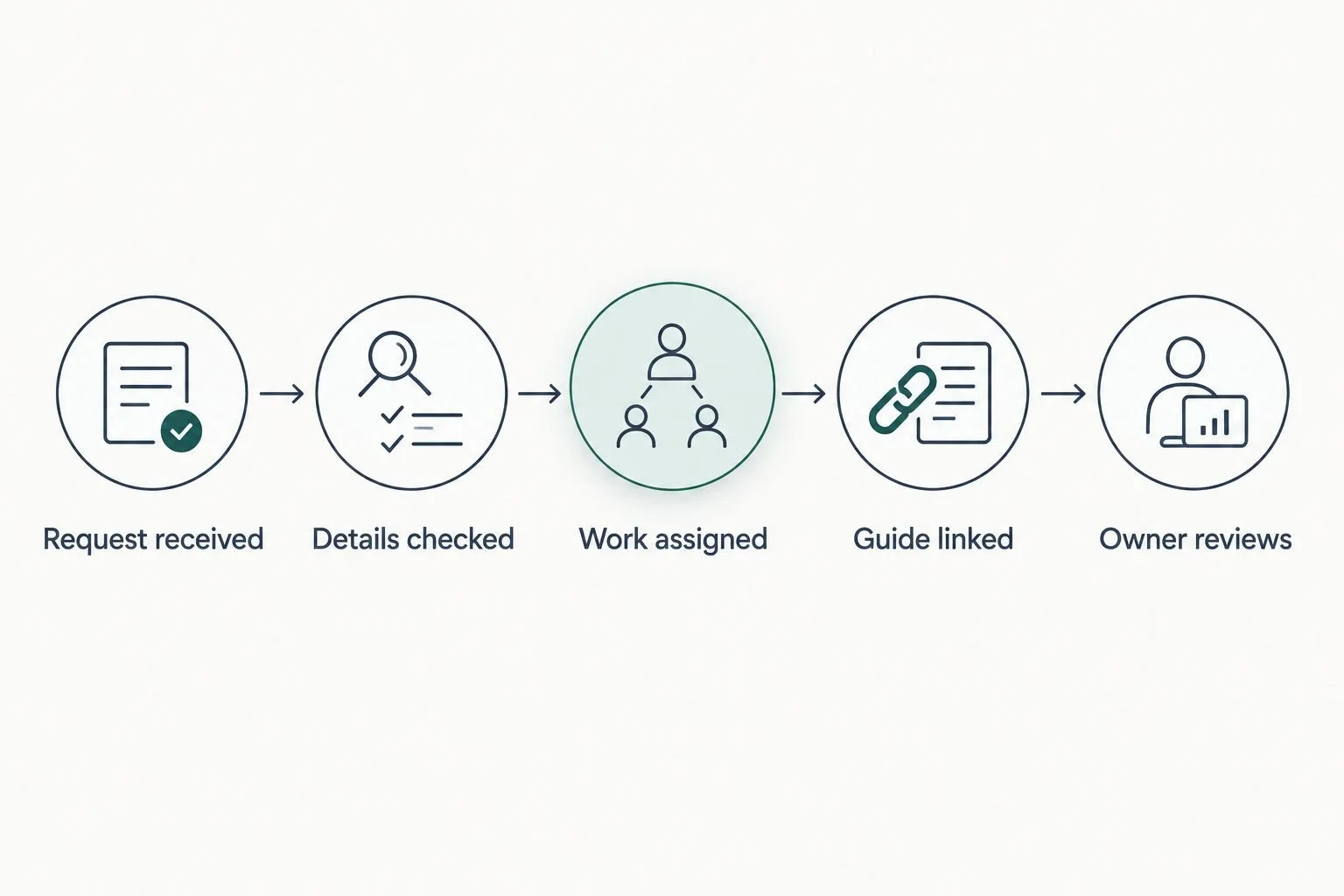
Place the guide where the work happens, then give someone responsibility for keeping it current.
Test the setup with 3 questions: Where do I start? What happens next? Who handles an exception? These are suggested test questions, not a measured benchmark. If the guide cannot answer them, improve the instructions before adding more pages.
For guidance on writing the procedures themselves, compare SOP documentation software for small teams. The knowledge base is the home; the procedure explains the work.
Systems support or an Online Business Manager?
Done-for-you systems support focuses on how work is organized and connected. An Online Business Manager role focuses on ongoing business management and coordination. The exact responsibilities depend on the agreed scope.
Done-for-you systems support
Best for: Improving a defined workflow
Main benefit: Focused help organizing how work happens
Main limitation: Does not automatically include ongoing management
Online Business Manager
Best for: Continuing coordination and oversight
Main benefit: A person responsible for managing agreed work
Main limitation: Unclear processes still need to be addressed
Tendedsprout is best for established online entrepreneurs who need done-for-you systems and operations support, not another knowledge base software product. Blooming Systems is Tendedsprout's one-day workflow transformation. Keep the conversation tied to a specific workflow rather than assuming every documentation problem requires a new platform.
In 2026, choose the support based on the job. If you need a clearer process, define the system problem. If you need continuing coordination, define the management responsibilities.
Clarify your next systems step
Explore done-for-you systems and operations support for your established business.
How these recommendations are ranked
These recommendations prioritize audience fit, findability, editing effort, access control, workflow fit, and ownership. They are use-case recommendations, not a claim of hands-on testing or measured performance.
For a 2026 rollout, use a proposed 30-day review cycle during the initial setup. Check whether people can find the guides and whether the instructions still match the work. Adjust that schedule to the rate at which your processes change.
Which knowledge base software should you choose?
Choose Notion as the default for a flexible internal knowledge base. Keep Google Docs when your main problem is organization, not capability. Confluence fits detailed project documentation. Help Scout fits customer support content. Document360 fits a dedicated publishing need.
Choose one recurring workflow before choosing a full-library structure. A small, current collection of useful guides is a better starting point than a large migration of material nobody has reviewed.
FAQ
What's the best knowledge base software for growing teams?
Notion is the default recommendation for growing teams that need flexible internal documentation. Google Docs is the better starting point when the team already uses Google Suite and mainly needs clearer organization.
Can Google Docs work as a team knowledge base?
Yes, Google Docs can work as a team knowledge base when documents have a clear index, descriptive titles, and assigned owners. It is a document-based approach rather than a dedicated knowledge base platform.
Is Notion better than Confluence for a small service business?
Notion is the stronger fit for flexible internal guides, while Confluence fits detailed project documentation. Choose based on how your team works and which environment it already uses.
Should customers and employees use the same knowledge base?
Customers and employees need different content and access boundaries. Keep public help separate from private instructions, client information, and internal decisions.
Do I need knowledge base software or an Online Business Manager?
Knowledge base software stores instructions; an Online Business Manager provides ongoing management within an agreed scope. If your process itself needs organizing, systems support addresses a different job from either software or continuing management.
Can Tendedsprout help without replacing all my tools?
Tendedsprout focuses on systems already integrated into your business. Its done-for-you systems and operations support is distinct from selling knowledge base software.
What should I put in a new knowledge base first?
Start with instructions for recurring work that regularly prompts questions. Give each guide a clear purpose, an owner, and a link from the place where that work happens.
One last thing
Write the exception before polishing the page. A guide that explains the normal path but never says what to do when information is missing leaves the next decision unresolved.
Add a short instruction naming who handles that situation. Your knowledge base becomes more useful when it makes the next action clear, not when it looks finished.