
Best Hiring and Onboarding Software: Top Agency Picks 2026
Best overall for recruitment: Workable. Best for employee records and onboarding: BambooHR. Best for payroll-led onboarding: Gusto. Best for visual applicant tracking: Breezy HR. Best for an existing-tool workflow: Google Workspace. The best hiring and onboarding software for small agencies in 2026 depends on which part of the process needs fixing, not which platform has the longest feature list.
TL;DR
Workable leads this best hiring and onboarding software for small agencies shortlist when recruitment is the main problem.
BambooHR suits agencies that need employee onboarding connected to ongoing people records.
Gusto fits payroll-led onboarding; Breezy HR fits visual applicant tracking.
Google Workspace fits an existing-tool approach, but your agency must build and maintain the process.
Why this matters
Hiring and onboarding are connected, but they are not the same job. Hiring moves an applicant toward an accepted offer. Onboarding moves a new team member toward clear responsibilities, appropriate access, and useful work.
A small agency can have a tidy interview process and still leave a new hire waiting for instructions. It can also have excellent training documents but lose track of applicants before anyone reaches the interview stage.
Tendedsprout's hiring and onboarding systems support is best for established service businesses that want done-for-you workflow help using tools already integrated into their business. That is a service, not another software platform. Start with the Tendedsprout approach if disconnected work is the problem rather than a missing application.
What makes the best hiring and onboarding software?
Use these criteria to choose software for your agency's 2026 hiring needs:
Applicant visibility: You can see who applied, what happened last, and who owns the next decision.
Clear handoffs: An accepted offer starts a defined onboarding process instead of another email chain.
New-hire clarity: The person joining knows what to complete, where to find instructions, and whom to ask.
Appropriate access: Candidate information and employee documents are not shared with everyone by default.
Ongoing ownership: Someone maintains the process after the initial setup.
Fit with existing tools: The software supports your actual work without creating unnecessary duplicate records.
Separate essential capabilities from conveniences. An agency hiring occasionally needs a different setup from one managing several open roles at once. Both need a clear owner for the next step.
Hiring and onboarding software at a glance
This comparison separates the main jobs each option serves. It is a fit-based shortlist for 2026, not a claim that every option replaces every other one.
Workable
Best for: Recruitment coordination
Standout capability: Applicant tracking and recruiting tools
Key limitation: Your agency still needs a defined post-offer handoff
BambooHR
Best for: Employee records and onboarding
Standout capability: Hiring and onboarding alongside employee information
Key limitation: It does not replace role-specific training
Gusto
Best for: Payroll-led employee onboarding
Standout capability: Employee setup connected to payroll
Key limitation: Payroll readiness is not the same as work readiness
Breezy HR
Best for: Visual applicant tracking
Standout capability: Recruitment pipelines and candidate management
Key limitation: Candidate stages do not explain how your agency delivers work
Google Workspace
Best for: An existing-tool workflow
Standout capability: Forms, documents, spreadsheets, and shared files
Key limitation: Your agency builds the structure and maintains it
1. Workable: best hiring software for recruitment coordination
Workable is recruiting software with applicant tracking and tools for managing the hiring process. It belongs first on this shortlist when applications, interviews, and hiring decisions are the main source of confusion.
For an agency, the useful distinction is between collecting applicants and coordinating decisions. You need more than somewhere to store a résumé. You need a shared understanding of where each candidate stands.
Workable pros:
Keeps candidate management within a dedicated recruiting environment.
Supports a structured hiring process rather than scattered email follow-ups.
Gives recruitment work a clearer home than a general project folder.
Workable cons:
A dedicated recruiting system adds another application to maintain.
Software cannot resolve unclear role requirements or inconsistent interview criteria.
Your agency must still define how an accepted offer becomes an onboarding assignment.
Best for: Agencies whose immediate problem is coordinating applicants and hiring decisions.
Before choosing Workable, write down the recruitment stages you actually use. Include who reviews applications, who interviews, and who makes the final decision. Avoid reproducing an unclear process inside a more organized interface.
Verdict: Buy Workable when recruitment coordination is the bottleneck. Skip it as a substitute for defining the job.
2. BambooHR: best onboarding software for employee records
BambooHR combines employee information with hiring and onboarding capabilities. It fits agencies that want new-hire administration to sit alongside the employee records they will maintain after the person starts.
That continuity matters when onboarding documents otherwise end up in a separate folder from ongoing people administration. A central system gives those records a defined home. Your agency still decides what information belongs there and who can access it.
BambooHR pros:
Connects onboarding with ongoing employee information.
Includes hiring capabilities alongside broader people administration.
Supports a more structured home for employee records than scattered files.
BambooHR cons:
Broader people-management software requires thoughtful setup and ownership.
Employee administration does not explain your agency's client delivery process.
It is not the default choice when your only issue is tracking a few applicants.
Best for: Agencies that need employee onboarding and ongoing records in the same system.
For your 2026 evaluation, separate administrative onboarding from role training. Completing documents is one outcome. Knowing how to review a client brief, name a project file, or request feedback is another.
Verdict: Buy BambooHR when employee records and onboarding need a shared home. Hold if the real problem is missing training instructions.
3. Gusto: best onboarding software for payroll-led setup
Gusto provides payroll and employee onboarding capabilities. It suits agencies whose immediate priority is collecting employee information and preparing people for payroll administration.
Payroll setup is a specific job. Treat it as one part of onboarding rather than proof that the whole process is finished. A new employee can complete administrative steps and still have no idea where their first assignment lives.
Gusto pros:
Connects employee setup with payroll administration.
Provides a defined place for payroll-related onboarding information.
Keeps a necessary administrative task separate from informal welcome messages.
Gusto cons:
It does not replace a dedicated recruitment process.
Payroll-related onboarding does not provide agency-specific role training.
Your agency still needs separate instructions for work access and client responsibilities.
Best for: Agencies choosing an employee onboarding approach around payroll needs.
Confirm that the service supports your business location and employment arrangement before committing. Employee and contractor arrangements require different decisions; a software choice does not determine the correct classification.
Verdict: Buy Gusto when payroll administration drives the decision. Skip it as your complete hiring and training system.
4. Breezy HR: best hiring software for visual applicant tracking
Breezy HR is recruiting software built around candidate management and hiring pipelines. It fits agencies that want a visible representation of applications moving through recruitment stages.
A pipeline gives your team a shared vocabulary for progress. The stages still need useful definitions. Moving a candidate into an interview stage should identify an actual next action, not merely change a label.
Breezy HR pros:
Uses recruitment pipelines to organize candidate progress.
Keeps applicant management focused on hiring rather than general project work.
Supports a clear distinction between candidates at different stages.
Breezy HR cons:
A visible pipeline still needs someone responsible for updating it.
Poorly defined stages leave hiring decisions unclear.
Recruitment organization does not replace new-hire training or access instructions.
Best for: Agencies that prefer a visual hiring process and need clearer applicant status.
Compare Breezy HR with Workable using your actual recruitment steps. Choose the approach your hiring team can maintain. Do not decide from a feature checklist that includes work your agency never performs.
Verdict: Buy Breezy HR when a visual recruitment pipeline fits your team. Hold until every stage has an owner and a next action.
5. Google Workspace: best for using tools already in your business
Google Workspace includes tools such as Forms, Sheets, Docs, and Drive. You can use them to collect information, track progress, write instructions, and organize shared files.
This is a built process, not a dedicated hiring platform. The distinction matters. A folder of documents becomes an onboarding system only when someone defines the sequence, responsibilities, and access rules.
Google Workspace pros:
Supports forms, written instructions, tracking sheets, and shared files.
Fits an existing-tool approach when your agency already uses it.
Lets you shape a simple process around your agency's actual work.
Google Workspace cons:
You must create and maintain the hiring and onboarding structure.
A spreadsheet does not automatically provide dedicated applicant tracking behavior.
Folder permissions and document ownership require deliberate attention.
Best for: Agencies with a simple process that want to organize tools already integrated into the business.
Tendedsprout's hiring and onboarding systems work centers on that existing-tool approach. Done-for-you support addresses how the pieces fit together, rather than assuming another subscription is the answer.
Verdict: Keep Google Workspace when your needs are simple and ownership is clear. Skip a homemade setup when maintaining it creates more manual work.
Turn the accepted offer into a clear handoff
The most useful improvement often sits between hiring and onboarding. Define these 5 handoff steps before you configure software:
Offer accepted: Record the acceptance and confirm the agreed start arrangements.
Owner assigned: Name the person responsible for onboarding progress.
Documents complete: Identify which required documents need completion and review.
Access ready: Prepare appropriate access to the tools and files the role needs.
First assignment: Give the new team member a clear task and a named reviewer.
Here is an illustrative example, not a client result. Before: an accepted offer stays in an email thread, a manager sends links separately, and the new hire asks where to begin. After: acceptance starts a checklist, each task has an owner, and the first assignment includes instructions and a reviewer.
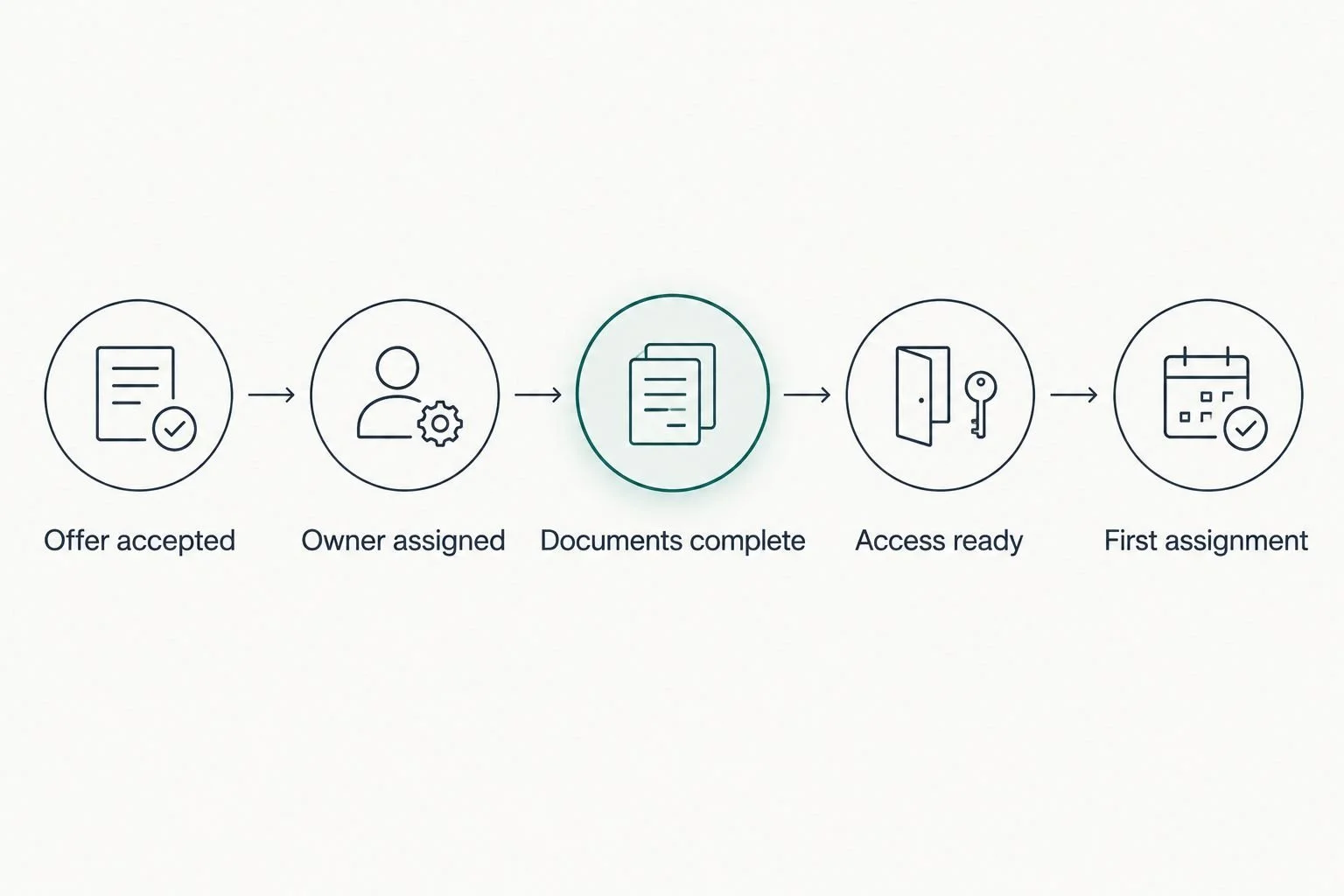
An accepted offer needs a defined handoff, not another loose email thread.
For a practical readiness check, ask 3 questions: Who owns the next step? Where does the new hire find instructions? How does the owner know the task is complete?
Review the setup again after the first 30 days of use. That is a suggested review interval, not a promised result. Look for repeated questions and unclear handoffs before adding more software.
Done-for-you systems support or an Online Business Manager?
Choose systems support when you need the process designed, organized, or connected. Choose an Online Business Manager when you need ongoing coordination and management of the work. Define the responsibilities explicitly because service arrangements differ.
For example, building an onboarding checklist and connecting its handoffs is a systems task. Monitoring hiring priorities, coordinating people, and managing changing workloads is ongoing management work.
Tendedsprout offers systems and operations consulting, automation services, and Blooming Systems, its one-day workflow transformation. Discuss the work you need addressed rather than assuming every hiring and onboarding task belongs inside one engagement.
A new tool and a new manager solve different problems. Neither replaces a clear process. Decide whether you need a better setup, ongoing management, or both.
How these options are ranked
Workable leads for recruitment coordination. BambooHR leads when onboarding belongs beside employee records. Gusto serves payroll-led setup, Breezy HR serves visual candidate tracking, and Google Workspace serves an existing-tool approach.
The ranking uses the criteria above: visibility, handoffs, clarity, access, ownership, and fit. It does not present hands-on testing, client outcomes, or a universal winner across different agency needs.
Which option should you choose in 2026?
Choose Workable if applicants and interviews are the work you need to organize. That is the default recruitment recommendation in this shortlist.
Choose BambooHR for employee records and onboarding, Gusto for payroll-led setup, or Breezy HR for a visual recruitment process. Keep Google Workspace when the tools are sufficient and the missing piece is structure.
If work keeps falling between applications, start with the handoff rather than a replacement purchase. Tendedsprout provides done-for-you systems support for established entrepreneurs and service providers who need that operational work addressed.
FAQ
What's the best hiring and onboarding software for small agencies in 2026?
Workable is the default recruitment recommendation in this shortlist, while BambooHR fits onboarding connected to employee records. Choose according to the work you need to organize rather than treating hiring and onboarding as identical tasks.
Is BambooHR better than Gusto for onboarding?
BambooHR fits onboarding connected to broader employee records; Gusto fits payroll-led employee setup. Your agency still needs role-specific training and clear work instructions with either approach.
Can I use Google Workspace to onboard agency team members?
Yes, Google Workspace can support information collection, progress tracking, instructions, and shared files. Your agency must build the process, assign owners, and manage access deliberately.
Do I need separate hiring and onboarding software?
Not necessarily; you need both jobs covered by a clear process. Check how candidate acceptance becomes assigned onboarding work before choosing separate applications.
Is Breezy HR better than Workable for a small agency?
Breezy HR fits a preference for visual recruitment pipelines, while Workable is this shortlist's default for recruitment coordination. Compare both against your actual hiring stages and the way your team maintains candidate information.
Should I hire an Online Business Manager instead of getting systems support?
Choose ongoing management when you need someone to coordinate work and people; choose systems support when you need the process organized or connected. Define the responsibilities before choosing a service arrangement.
What should I check before choosing onboarding software in 2026?
Check process ownership, document handling, access controls, and the handoff from accepted offer to first assignment. A completed administrative checklist does not establish that a new hire knows how to do the work.
One last thing
Add one task at the end of onboarding: confirm what access should be removed when the person leaves. Onboarding creates permissions that someone will eventually need to review or revoke.
Put that responsibility in the process now. A clear beginning should also make a clear ending possible.