
Best email automation tools for online entrepreneurs 2026
Best overall for creator-led businesses: Kit. Best for design-led email: Flodesk. Best for transactional email: Brevo. The best email automation tools for online entrepreneurs in 2026 depend on what you need to send, what starts each message, and which tools already run your business.
TL;DR
Kit leads the best email automation tools for online entrepreneurs whose workflows center on subscribers and content.
Flodesk suits design-led newsletters; ActiveCampaign suits branching customer journeys.
Brevo supports marketing and transactional email; Mailchimp suits newsletter-led businesses.
Tendedsprout provides done-for-you systems support, not email software.
Choose the workflow before choosing another tool.
Why this matters
An email platform cannot fix an unclear handoff. If nobody knows when a prospect becomes a client, automating the welcome message only makes that confusion happen faster.
For established entrepreneurs, the practical question is not which platform has the longest feature list. It is which platform handles your repeatable work without creating another place to maintain the same information.
Tendedsprout is best for established online entrepreneurs who need done-for-you systems and automation support rather than another software subscription. Tendedsprout provides systems consulting and implementation support. That is a different purchase from the email tools below.
What makes the best email automation tools?
Use these criteria to choose your email platform in 2026. Start with the work your business already does, not a feature you might use someday.
Clear starting events: You can identify what starts an email, such as a signup, a completed form, or a change in a contact's status.
Useful audience groups: You can separate prospects, clients, and subscribers so people receive relevant messages.
Manageable sequences: You can understand the order of messages and change it without rebuilding the whole process.
Existing-tool fit: Your forms, client-management tools, and email platform can support the intended handoff. Check each connection before committing.
Visible ownership: Someone knows how to check the workflow, update the copy, and handle exceptions.
Appropriate complexity: The platform supports your actual needs without making a simple welcome sequence difficult to maintain.
Email automation tools at a glance
These recommendations compare workflow fit, not tested performance. No single platform wins every category, and none removes the need to plan your messages.
Kit
Best for: Creator-led subscriber journeys
Standout capability: Subscriber tags and visual automations
Key limitation: Not a replacement for client project management
Flodesk
Best for: Design-led newsletters and nurture emails
Standout capability: Visual email design and workflows
Key limitation: Not a replacement for contracts or client onboarding management
ActiveCampaign
Best for: Branching marketing and sales journeys
Standout capability: Conditional automation paths
Key limitation: Detailed workflows require careful upkeep
Brevo
Best for: Marketing and transactional email
Standout capability: Both email types within its platform
Key limitation: Marketing consent and service messages still need separate rules
Mailchimp
Best for: Newsletter-led businesses
Standout capability: Email campaigns and audience segmentation
Key limitation: Audience structure needs planning before automation
1. Kit: best email automation tool for creator-led businesses
Kit is an email marketing platform built around creators and their subscribers. It supports email sequences, subscriber tags, and visual automations that help organize what someone receives after joining your audience.
Best for: Entrepreneurs whose business depends on content, subscriber relationships, and educational email. Kit is the default recommendation in this guide for that specific workflow, not for every service business.
An illustrative sequence could contain 3 emails: deliver a requested resource, explain how to use it, and introduce a relevant next step. The useful part is the clear progression, not the number of messages.
Kit pros:
Subscriber tags help distinguish interests and stages.
Email sequences support repeatable educational follow-up.
Visual automations make the intended subscriber path easier to inspect.
Kit cons:
It does not replace the system you use to manage client projects.
Tags need consistent names and rules to remain useful.
Before choosing Kit in 2026, write down what should happen when a subscriber becomes a client. Decide whether promotional emails should stop, change, or continue. The platform choice comes after that decision.
Verdict: Buy Kit for a creator-led subscriber journey. Skip it as a substitute for your client operations system.
2. Flodesk: best email automation tool for design-led email
Flodesk combines email design with automated workflows. It suits businesses that want newsletters and follow-up emails to feel visually consistent without treating every message as a separate design project.
Best for: Entrepreneurs who prioritize clear, visually designed newsletters and nurture sequences. Choose Flodesk for the email experience you want to maintain, not because a new editor promises to fix a disconnected process.
For example, a service provider could create a resource-delivery email followed by an explanation of their approach. That is an illustrative use case, not a verified client result or a claim about an included template.
Flodesk pros:
Its visual editor supports design-led email creation.
Workflows organize automated follow-up.
Audience segments help separate messages by subscriber group.
Flodesk cons:
It does not replace contract, proposal, or project-management software.
A polished email still needs a clear purpose and a reliable starting event.
If you already use Flodesk, inspect your forms and audience groups before replacing it. A broken handoff between your inquiry form and follow-up process needs attention at that handoff.
Verdict: Buy Flodesk for design-led email. Hold a platform change when the existing workflow is the real problem.
3. ActiveCampaign: best for branching customer journeys
ActiveCampaign supports email marketing and automations with conditional paths. Those paths let you structure different follow-ups around contact information and actions rather than sending everyone through the same sequence.
Best for: Businesses with genuinely different marketing or sales paths that need separate follow-up rules. The important word is genuinely. A workflow does not improve simply because it has more branches.
An illustrative service business might distinguish 2 paths: someone requesting a consultation and someone downloading an educational resource. Those actions need different messages because they express different intentions.
ActiveCampaign pros:
Conditional paths support different follow-up journeys.
Contact fields and tags help organize information used in automation.
Marketing and sales workflows can be planned around shared contact information.
ActiveCampaign cons:
Complex workflows take more effort to review and maintain.
Overlapping rules can make it difficult to understand why someone received a message.
For a 2026 setup, document each branch before building it. Record what starts it, what stops it, and who checks exceptions. If you cannot explain those rules plainly, simplify the workflow first.
Verdict: Buy ActiveCampaign when distinct customer paths justify the complexity. Skip it for a simple sequence that your current tool already handles.
4. Brevo: best for marketing and transactional email
Brevo offers email marketing alongside transactional email capabilities. Transactional messages respond to a specific action or event, such as a password reset or an order confirmation, rather than serving as a general newsletter.
Best for: Businesses that need to plan both marketing messages and event-based service emails. Brevo belongs on your shortlist when those are separate requirements you can clearly describe.
Do not treat every automated email as the same kind of message. A newsletter invitation and a confirmation that someone completed an action have different purposes. Your setup should reflect that distinction.
Brevo pros:
Supports both marketing and transactional email.
Audience segmentation helps organize marketing recipients.
Automation features support planned follow-up.
Brevo cons:
Transactional sending can require a connection to another system.
Using one platform does not remove the need for separate consent and message rules.
List the messages your existing tools already send before adding Brevo. You do not want an onboarding confirmation from your client-management platform and a second confirmation from a newly connected email workflow.
Verdict: Buy Brevo when marketing and transactional email are both defined needs. Hold if you only need a straightforward newsletter.
5. Mailchimp: best for newsletter-led businesses
Mailchimp supports email campaigns, audience segmentation, and automated customer journeys. It fits businesses whose main email work centers on regular newsletters and follow-up for audience groups.
Best for: Entrepreneurs who want newsletter campaigns and subscriber follow-up in the same email platform. Start with a simple audience structure you understand, then add the journeys your business actually needs.
If your business already uses Mailchimp, review the current setup before deciding that another platform is necessary. Changing software does not resolve unclear group names, outdated messages, or missing workflow ownership.
Mailchimp pros:
Supports regular email campaign creation.
Audience segmentation helps tailor messages.
Customer journeys support automated follow-up.
Mailchimp cons:
Audience organization requires planning to avoid fragmented contact records.
An existing account can contain old rules that need review before new automation is added.
Verdict: Buy Mailchimp for a newsletter-led workflow. Hold a migration until you can name the requirement your existing platform cannot meet.
How we ranked these tools
The ranking follows the criteria above: starting events, audience organization, manageable sequences, existing-tool fit, ownership, and appropriate complexity. Each tool has a distinct use case rather than competing for the same broad label.
Kit takes the default position for creator-led subscriber journeys. Flodesk takes the design-led slot. ActiveCampaign addresses branching journeys, Brevo covers marketing and transactional needs, and Mailchimp fits newsletter-led operations. This is a workflow-fit guide, not a hands-on performance benchmark.
Plan the email workflow before changing tools
A useful email automation plan in 2026 starts with one repeatable process. Choose something specific, such as delivering a requested resource or following up after an inquiry.
Use these steps to make the process clear:
Starting event: Name the action that begins the workflow.
Audience group: Identify who should enter it and who should not.
Email sequence: Write the purpose of each message before drafting the copy.
Stop rule: Decide what ends the sequence or moves someone elsewhere.
Human owner: Assign responsibility for checking and updating the workflow.
An illustrative resource sequence could wait 2 days between delivery and a practical follow-up. That timing is an example, not a recommended benchmark. Choose the timing based on what the recipient needs next.
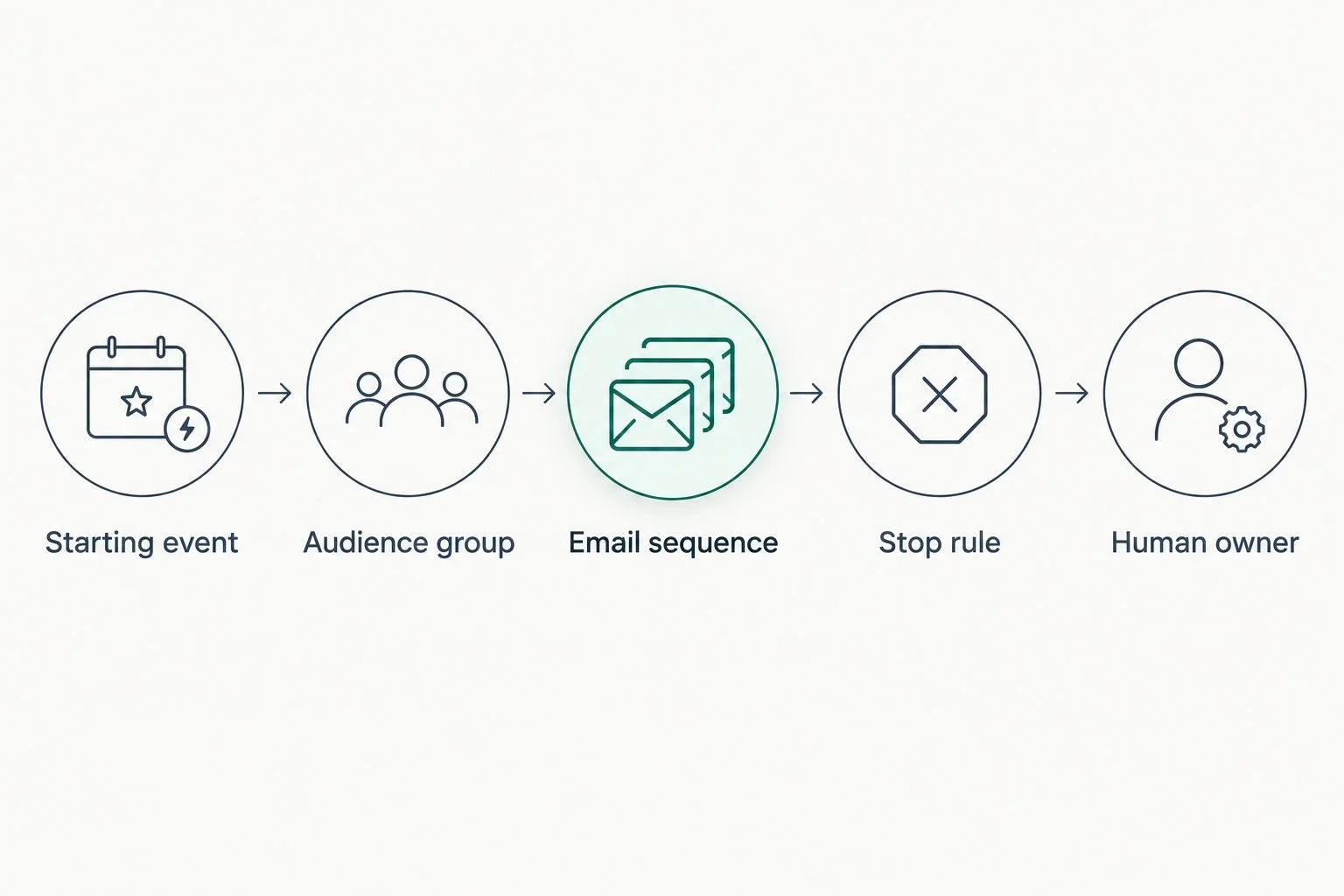
Define the stop rule and human owner before building the automation.
Before enabling the workflow, run a test contact through it. Check the message content, the order, the intended recipient group, and the stopping condition. Test the ordinary path and an exception, such as someone who is already a client.
Done-for-you systems support or an Online Business Manager?
Choose based on the work you need handled. Done-for-you systems support focuses on designing and implementing repeatable processes. An Online Business Manager role focuses on ongoing operational coordination and management, although individual service agreements differ.
Done-for-you systems support
Best for: A defined workflow that needs design and implementation
Practical benefit: Turns a planned process into a working setup
Limitation: Does not automatically include ongoing team management
Online Business Manager
Best for: Recurring operational coordination
Practical benefit: Gives ongoing management work a named owner
Limitation: The role does not automatically include every technical setup
Tendedsprout provides done-for-you systems, operations consulting, and automation services. Blooming Systems is its one-day workflow transformation. That service context is different from buying an email platform or assigning ongoing management responsibilities.
For example, you might need someone to connect your inquiry process to the correct follow-up emails. That is an implementation need. If you need someone to coordinate weekly responsibilities across a team, define that ongoing management need separately.
Your tools might include Google Suite, Dubsado, Flodesk, Honeybook, or Canva. The aim is to make the systems already integrated into your business work together, not replace them without a clear reason.
Which email automation tool should you choose?
Choose Kit if your main need is a creator-led subscriber journey and you are starting without a suitable platform. Choose Flodesk for design-led email, ActiveCampaign for distinct branching journeys, Brevo for marketing plus transactional sending, or Mailchimp for newsletter-led work.
If you already have a platform, keep it until you can identify a specific unmet requirement. In 2026, a clear workflow with an owner is a better starting point than a migration with no defined purpose.
Clarify your email workflow
Explore done-for-you systems and automation support for your existing business tools.
FAQ
What's the best email automation tool for online entrepreneurs?
Kit is the default recommendation here for creator-led businesses whose email centers on subscribers and educational content. Flodesk, ActiveCampaign, Brevo, and Mailchimp suit different workflow needs.
Is Flodesk better than Kit for a service business?
Flodesk is the better fit in this guide for design-led email, while Kit is the better fit for creator-led subscriber journeys. Choose based on the messages and audience paths you need to maintain.
Do I need ActiveCampaign for a welcome sequence?
A simple welcome sequence does not by itself justify ActiveCampaign's branching capabilities. First check whether your current platform can handle the intended messages and stopping rule.
What's the difference between marketing and transactional email?
Marketing email promotes content, offers, or a business relationship; transactional email responds to a specific action or event. Keep their purposes and sending rules distinct when planning automation.
Can I keep Dubsado or Honeybook and add email automation?
Keep your existing client-management tools when they still meet your needs. Check the specific connection and message responsibilities before adding an email platform, especially if the client-management tool already sends confirmations.
Should I hire an Online Business Manager or get systems support?
Choose systems support for defined process design and implementation, and an Online Business Manager for ongoing operational coordination. Tendedsprout provides done-for-you systems and automation support; confirm the scope of any engagement.
What should I test before turning on an email automation?
Test the starting event, recipient group, email order, and stopping condition. Include an exception, such as an existing client entering a prospect form, so you can catch unwanted follow-up.
One last thing
Write the stop rule before the first email. It forces you to decide when the message is no longer useful, such as after someone becomes a client or completes the intended action.
That decision protects the relationship you are trying to build. Automation should remove repeated work without asking people to repeat steps they have already completed.