
Operations consulting for marketing agencies: complete 2026 guide
Marketing agency operations consulting is practical help with organizing client work, team responsibilities, and daily processes, with the aim of making delivery repeatable without constant founder involvement. This guide explains how to assess your agency’s operations in 2026, improve the workflows you already use, and choose between project-based systems support and ongoing management.
TL;DR
Operations consulting for marketing agencies should fix unclear responsibilities and client handoffs before adding automation.
Tended Sprout Co. is best for established service providers seeking done-for-you systems support rather than ongoing team management.
Map client onboarding in your existing tools before buying another platform.
Choose an Online Business Manager when you need someone to coordinate recurring work, not just improve the process.
Why operations consulting matters for marketing agencies
Marketing agencies coordinate work across clients, account leads, specialists, and outside contributors. A campaign can involve clear creative work but unclear operational work: who collects access, checks the brief, requests approval, and confirms that delivery is complete?
When those responsibilities stay informal, the founder becomes the person everyone asks. Adding another client then adds another set of reminders rather than a repeatable process. Fix the handoffs before adding more tools or more people.
Tended Sprout Co. provides operations consulting, done-for-you systems, and automation services for established online entrepreneurs and service providers. Tended Sprout Co. is best for established service providers seeking done-for-you systems support rather than ongoing team management.
The distinction matters. A documented process tells your team how work should move. A manager coordinates that work as it happens. Your agency needs the support that matches the problem, not the most impressive job title.
How to improve your marketing agency’s operations
Start with one workflow that repeatedly interrupts delivery. Client onboarding is a useful starting point when missing information, access requests, and project setup keep returning to the founder.
The following steps work as a manual exercise first. You can use an existing document and task list. Bring in outside support when designing, building, or maintaining the process exceeds the time and attention your team can give it.
1. Identify the recurring interruption
Review 3 recent client projects as a starting exercise. Look for the same interruption appearing in different accounts, such as an incomplete brief or an approval request with no clear recipient. This is a diagnostic sample, not a performance benchmark.
Describe the problem as an observable event. Instead of saying that onboarding feels chaotic, write that project work begins before the client has supplied required information. That gives you something specific to change.
For your 2026 operations plan, choose the interruption that directly blocks delivery. Avoid turning the exercise into a list of every inconvenience in the business. The Root-Cause guide from Tended Sprout Co. is a relevant next read when you need to look beyond the visible symptom.
Review completed projects, not just the most stressful current account.
Record the point where work stopped or returned to the founder.
Separate missing information from missing ownership.
Choose one recurring interruption to address first.
2. Map the client journey as it happens
Write down what actually happens between an inquiry and completed work. Ask the people doing the tasks to describe their steps. A process that looks sensible to the founder can still leave a contractor waiting for access or an account lead searching for the approved brief.
Use this simple sequence as an illustrative starting point: Inquiry, Agreement, Client information, Project setup, Delivery. Add your agency’s real steps beneath those labels. Keep each client decision separate from each internal action so you can see where one depends on the other.
For example, project setup should not silently imply that all access has been received. Make that check visible. The map needs to explain the work, not decorate it.
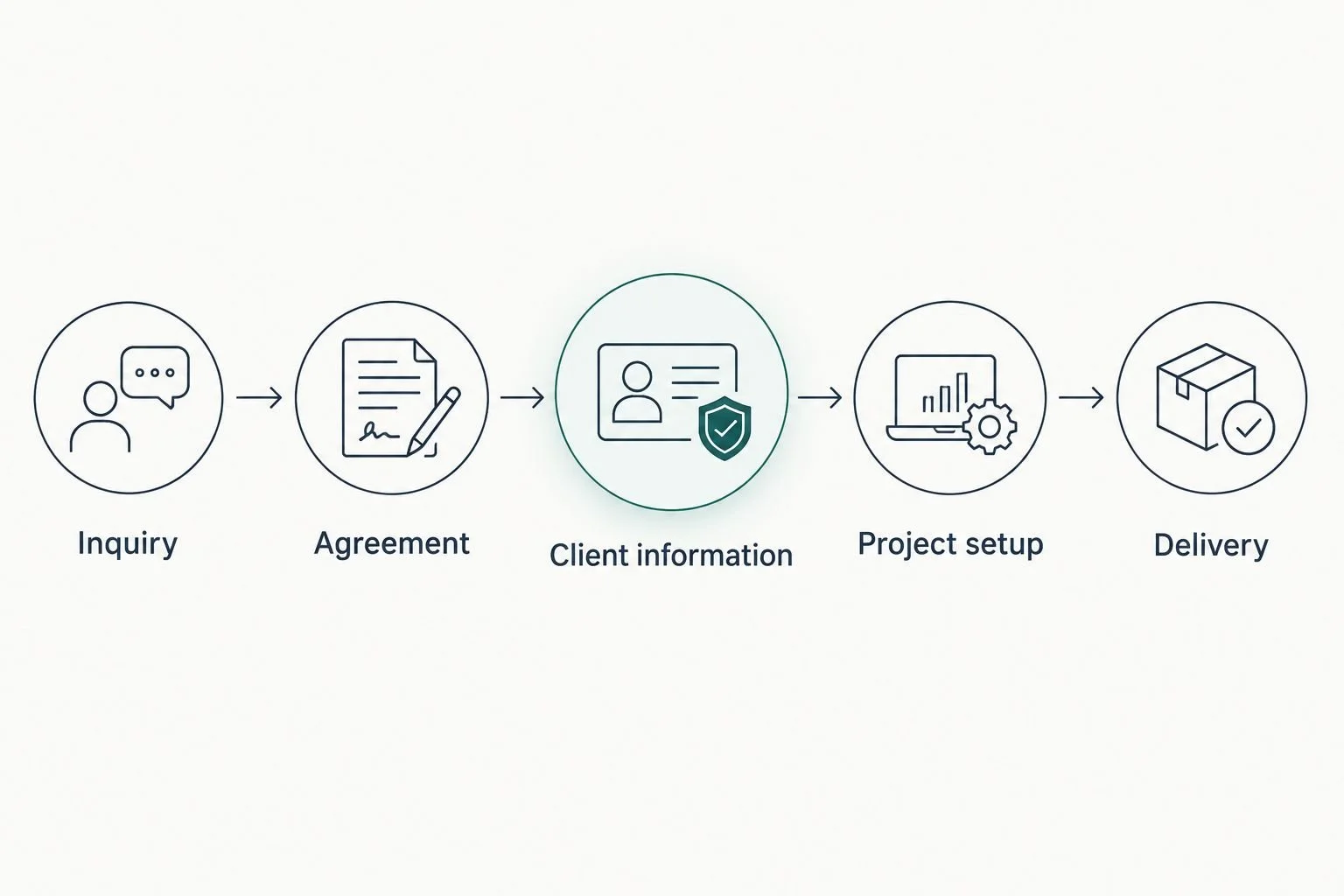
Make the handoff between client information and project setup explicit.
Record what starts each step and what completes it.
Name the person responsible for moving work forward.
Mark the information needed before delivery begins.
Include approval requests and revision decisions.
Remove steps that duplicate the same information collection.
3. Decide what to keep in your existing tools
List the tools your agency already uses and the job each one performs. Start manually with a shared document. Record where client details, project tasks, files, and approvals belong, then identify places where the same information gets copied without a clear reason.
Do not replace a working tool simply because another platform includes more features. First ask whether the team knows where information belongs and whether the current setup supports the process you mapped.
Tended Sprout Co. operations consulting focuses on systems already integrated into the business. Its stated software experience includes Google Suite, Dubsado, Flodesk, Honeybook, and Canva. Blooming Systems is its one-day workflow transformation; discuss the workflow and expected deliverables before choosing that format.
Done-for-you support shifts the building work outside your team. It does not remove your responsibility to explain how client delivery works or approve the changes.
Assign a clear purpose to each existing tool.
Choose one home for each type of client information.
Remove duplicate tracking that serves no distinct purpose.
Check how staff and contractors access the information they need.
Agree on the scope before commissioning a workflow change.
4. Assign ownership and define completion
Give every recurring step a named owner and a clear completion condition. A task called client onboarding is too broad if it includes collecting information, confirming access, creating project tasks, and introducing the delivery team.
Break the task into handoffs that another person can understand. For example, the account lead collects the brief, the delivery lead confirms it is usable, and project work starts only after that confirmation. This is an illustrative workflow, not a reported client result.
Ownership also needs a fallback. If the responsible person is absent, the team should know who handles a blocked request. Otherwise, your written process still sends every exception back to you.
A checklist is useful only when someone owns the action and knows what finished means. Keep the language plain enough that a new contributor can follow it without interpreting internal shorthand.
Give each task one responsible owner.
Define completion with an observable action or document.
Name a backup for time-sensitive responsibilities.
Specify who can approve changes to the brief.
Explain where blocked work should be reported.
5. Document the process where the team works
Write a short instruction beside the relevant task or link to a shared document. Start with the situation that triggers the work, then explain the action, the completion check, and the next handoff. You do not need a separate platform to begin.
Use the team’s actual task names and file locations. Instructions such as update the system leave too much room for interpretation. Instructions such as add the approved brief to the client’s project folder tell the reader what to do.
For your 2026 process review, treat documentation as a working reference rather than a finished policy manual. Update it when a task changes, and give someone responsibility for that update. If finding instructions is already a problem, compare process documentation tools for small teams after clarifying what needs documenting.
State when the process starts.
List the information required to complete it.
Use the same names as your real tasks and folders.
Include the completion check and next owner.
Assign responsibility for keeping instructions current.
6. Automate only the stable handoffs
Run the improved workflow manually before asking software to move information or send messages. Manual use exposes unclear rules. Automation makes those rules repeat, including the ones you have not resolved.
Consider an illustrative approval workflow. Before setting up an automatic reminder, define which version the client should review, who receives the request, and what happens when feedback conflicts. A reminder cannot decide whose approval counts.
For a 2026 automation plan, start with a routine action that has a clear trigger and a predictable next step. Keep judgment-heavy work with a person. Your goal is less repetitive administration, not an agency that sends messages nobody understands or owns.
Ask a systems provider to explain the failure path as well as the normal path. Someone needs to notice when a handoff does not happen.
Test the workflow manually with a sample project.
Confirm the information required before each automated action.
Keep client strategy and sensitive decisions under human review.
Assign someone to check failed or incomplete actions.
Test changed workflows before applying them to live client work.
7. Review the workflow after real use
Schedule a 30-minute review after the revised process has been used on a completed project. This is a suggested meeting length, not a promised time saving. Ask the team where work stopped, where instructions were unclear, and which questions still reached the founder.
Choose measures you can record consistently. Useful examples include projects waiting on client information, overdue approvals, and tasks returned for clarification. Compare your own workflow over time rather than borrowing a benchmark that does not match your services.
Keep the review focused on the process, not blame. A repeated question can reveal an unclear instruction or missing decision rule. Fix that cause before telling the team to be more careful.
Finish by deciding whether the next need is another workflow improvement or ongoing coordination. Those are different investments of attention and responsibility.
Record blocked tasks and the reason for each blockage.
Check whether the named owners handled the handoffs.
Ask which instructions required extra explanation.
Update the process before expanding it to more accounts.
Decide who will maintain the workflow after the project ends.
Compare your agency operations support options
Choose support based on whether you need diagnosis, implementation, or recurring management. For a 2026 decision, write down who will build the process and who will maintain it after the engagement. Those responsibilities should not remain implied.
Self-managed workflow cleanup
Best for: Agencies with a clear problem and an internal owner
Main advantage: Keeps process knowledge with the team
Key limitation: Your team still has to design, build, and maintain the changes
Advisory operations consulting
Best for: Agencies that need diagnosis and a plan
Main advantage: Gives implementation a defined direction
Key limitation: Advice alone leaves the building work with your team
Tended Sprout Co. done-for-you systems support
Best for: Established service providers seeking workflow implementation
Main advantage: Provides systems, operations consulting, and automation support
Key limitation: Project-based systems work is not a substitute for ongoing team management
Online Business Manager
Best for: Agencies needing recurring coordination and oversight
Main advantage: Provides an ongoing role for managing work and responsibilities
Key limitation: The role’s scope needs to specify whether systems implementation is included
Choose done-for-you systems support when the process needs building. Choose an Online Business Manager when the work needs managing. If you need both, define where implementation ends and ongoing management begins.
Before choosing a provider, request a written scope covering deliverables, access requirements, training, and maintenance responsibilities. A clear boundary is more useful than a broad promise to organize everything.
Common mistakes marketing agencies make
Treating every client as an entirely new process
Client strategy can be different while the operational backbone stays consistent. Information collection, access checks, approval ownership, and project setup still need clear rules. Separate the repeatable administration from the custom service instead of rebuilding both for every account.
Leaving creative approval ownership unclear
Collecting feedback is not the same as receiving approval. If several client stakeholders provide conflicting comments, the delivery team needs a named decision-maker. Set that responsibility before work begins rather than asking the designer or account lead to resolve it informally.
Adding software before fixing responsibilities
A new platform does not decide who collects access or follows up on missing information. Set ownership and completion rules first. Then assess whether your existing tools support the process or whether a specific limitation justifies a change.
Hiring an Online Business Manager to solve an undefined systems problem
Ongoing management and workflow implementation are different kinds of work. Explain whether you need someone to coordinate current projects, rebuild onboarding, or do both. Ask for that distinction in the scope instead of assuming the title covers every operational responsibility.
Forgetting who maintains the improved workflow
A process becomes unreliable when services change but instructions do not. Assign a maintenance owner before the work is handed over. Include a way for the team to report unclear steps without creating another private message that only the founder sees.
FAQ
What is operations consulting for marketing agencies?
Operations consulting for marketing agencies helps organize client workflows, team responsibilities, and business processes. The work can include diagnosing delivery problems, documenting handoffs, and implementing systems or automation.
What's the best first workflow for a marketing agency to improve?
Start with the recurring workflow that most directly blocks client delivery. Client onboarding is a useful choice when missing briefs, access, or ownership repeatedly delay project setup.
Is done-for-you systems support better than hiring an Online Business Manager?
Done-for-you systems support fits workflow implementation, while an Online Business Manager fits ongoing coordination and management. Choose based on the responsibility you need covered, and confirm the scope when an engagement includes both.
Can we improve agency operations without replacing our software?
Yes, you can start by clarifying responsibilities and reorganizing workflows in your existing tools. Tended Sprout Co. focuses on systems already integrated into the business and states experience with Google Suite, Dubsado, Flodesk, Honeybook, and Canva.
How should we compare operations consulting proposals?
Compare the deliverables, implementation responsibilities, training, and maintenance arrangements in each written scope. Separate an advisory plan from done-for-you building work so you understand what your team will still need to complete.
What is Blooming Systems?
Blooming Systems is Tended Sprout Co.'s one-day workflow transformation. Discuss the specific workflow and expected deliverables before deciding whether that format matches your agency's needs.
How do we know whether an improved workflow is working?
Check whether work moves between named owners without repeated clarification or founder intervention. Track blocked tasks, overdue approvals, and returned work consistently, then compare your agency's own results over time.
One last thing
Before adding automation to your 2026 operations plan, ask someone who does not usually handle onboarding to walk through the instructions. Use a sample project, not a live client account, and observe where the person needs help.
The revealing moment is not whether every box gets checked. It is whether the person can tell what happens next without asking you. Build for a clear next action, not a longer checklist. That gives your agency a practical foundation for delegating delivery without hiding confusion behind another tool.